I’ve been working on a codebase with over 300 Flyway migrations, and at some point I realized something uncomfortable: nobody on the team could tell you what the schema actually looks like. The migrations are sequential, append-only, and opaque. Each one makes a small change — add a column here, drop an index there — but the cumulative effect is invisible. You can’t diff two points in time. You can’t ask “which tables reference this column?” without reading 50 files. You can’t tell a new developer what the final schema state is without running every migration against a live database.
That frustration is what led me to build SQLfy. It reads every migration file, parses the SQL into an AST, and reconstructs the final schema as a queryable graph — then gives you 33 ways to analyze it. No database connection needed. No credentials. Just your migration files and a Python installation.
The Migration Black Box
Flyway is excellent at what it does: applying SQL migrations in order, tracking which ones have run, and failing loudly when something goes wrong. But it’s a write-once system. Migrations are append-only, and the only way to understand the current state of your schema is to apply them all against a database.
This creates several practical problems:
Schema opacity. After 200 migrations, the “schema” is the cumulative effect of 200 individual DDL statements. Nobody holds the full picture in their head. Junior developers learn the schema by running SELECT * FROM information_schema.columns against a dev database, which tells them what exists but not why.
Point-in-time questions. “What did the schema look like before we added the multi-tenancy columns?” requires either a time-machine database backup or reading 40 migration files and mentally simulating their effects. Neither is practical.
Drift detection. Two branches might have divergent migrations. Comparing them means running both sets against separate databases and diffing the results — a process that’s slow, error-prone, and requires database credentials.
AI context. If you want an AI agent to write SQL against your schema, you need to give it the schema. But the schema doesn’t exist as a file — it exists as a sequence of transformations. Someone has to materialize it first.
SQLfy solves all of these problems with a single tool. Feed it your migration directory, and it reconstructs the schema state at any Flyway version, as an in-memory graph you can query, analyze, and export.
What SQLfy Does
At its core, SQLfy does one thing: it reads your Flyway migration files in order, applies each DDL statement to an in-memory representation, and produces a complete snapshot of your schema at any point in the migration timeline.
What that gives you in practice is a bunch of things I didn’t have before. You can reconstruct the schema at any Flyway version — not just the current state, but any historical point. You can diff two versions and see exactly what changed. You can ask “what would break if I reverted this migration?” and get a real answer. You can export the schema as DDL, as structured data, or as pre-formatted chunks ready for an LLM to consume.
The output is a graph, not a flat listing. Tables are nodes. Foreign keys are edges. Constraints, indexes, and sequences are attributes. This means you can traverse relationships — “show me everything that depends on the users table” — without writing complex joins against information_schema.
And you can do all of this without a database connection. No credentials, no network access, no risk of accidentally touching production. Just your migration files and Python.
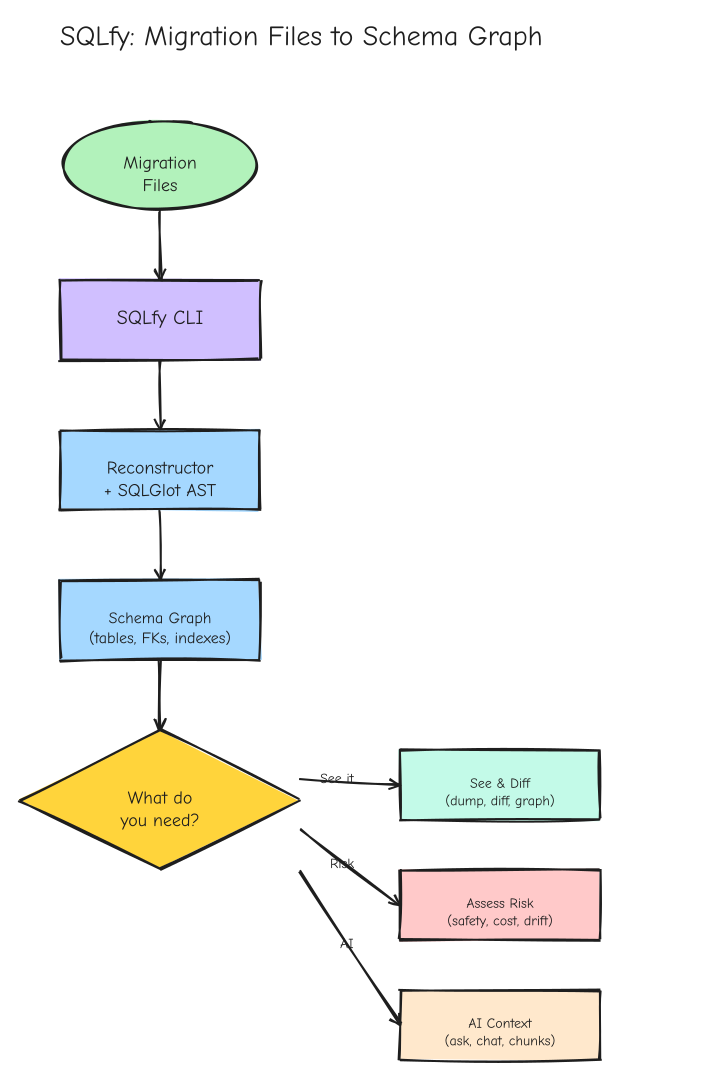 The high-level pipeline: Flyway migration files go in, a queryable schema graph comes out. From there, 33+ subcommands let you see, diff, assess, and reason about your schema.
How It Works: The Reconstructor
The Reconstructor class is the heart of SQLfy. It’s a stateful migration processor that accepts Flyway migration files, parses each one’s SQL statements via SQLGlot into AST nodes, dispatches each statement to specialized handlers, and maintains an in-memory representation of the schema state.
The dispatch loop is the key architectural pattern. When the Reconstructor encounters a SQL statement, it looks at the statement type and routes it to the appropriate handler:
def _process_statement(self, statement):
    stmt_type = statement.find_type(Create)
    if stmt_type:
        return self._create_table(statement)
    stmt_type = statement.find_type(AlterTable)
    if stmt_type:
        return self._alter_table(statement)
    stmt_type = statement.find_type(Drop)
    if stmt_type:
        return self._drop_table(statement)
    # ... CREATE INDEX, DROP INDEX, CREATE SEQUENCE, etc.
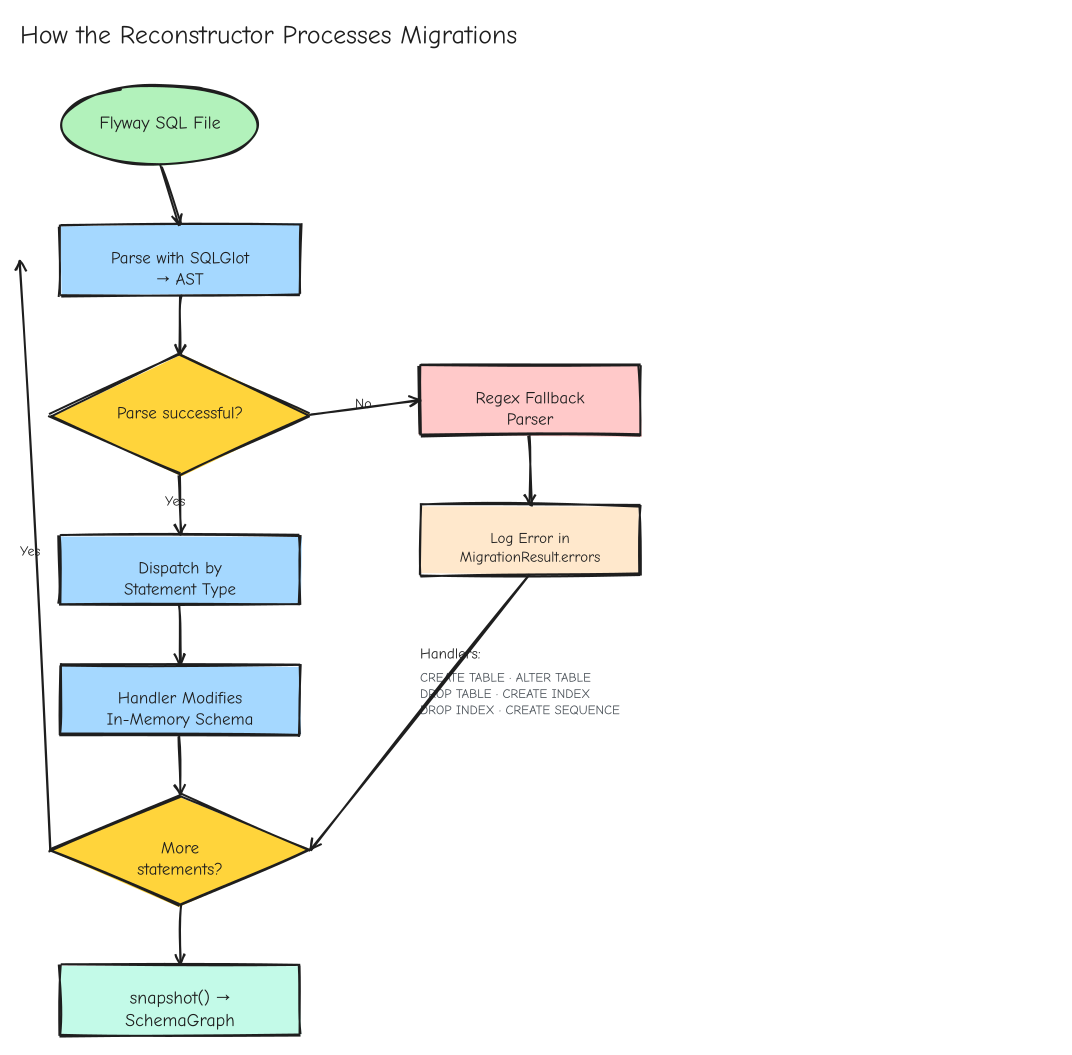 How the Reconstructor processes each migration: SQLGlot parses statements into an AST, a dispatch loop routes them to type-specific handlers, and a regex fallback catches what the parser can’t handle. Errors are logged but never stop the run.
Each handler modifies the in-memory schema state. _create_table adds a new table with its columns, constraints, and indexes. _alter_table handles ADD/DROP/MODIFY/RENAME COLUMN and ADD/DROP CONSTRAINT. _drop_table removes the table and all its relationships. The handlers are stateful — they maintain the schema as a living representation, not a static snapshot.
SQLGlot handles the majority of SQL statements — CREATE TABLE, ALTER TABLE, DROP TABLE, CREATE INDEX, DROP INDEX, CREATE SEQUENCE, DROP SEQUENCE, COMMENT ON. It parses them into a structured AST that the handlers can navigate programmatically. But SQLGlot doesn’t handle everything. Oracle’s MODIFY syntax for column changes, certain CREATE INDEX variants with complex options, and dialect-specific quirks in MySQL and PostgreSQL sometimes produce parse errors.
SQLfy’s answer is pragmatic: when SQLGlot can’t parse a statement, fall back to targeted regex parsing on the raw SQL. Errors are logged and collected in MigrationResult.errors while processing continues. One bad statement in a migration file doesn’t kill the entire run. This is an honest engineering trade-off — perfect parsing would require a custom SQL parser for each dialect, which is a multi-year project. The hybrid approach gets you 95% coverage with SQLGlot and fills in the gaps with regex, which is good enough for real-world migration files that rarely use the most exotic syntax.
Three processing modes are available: incremental (apply_file()) for streaming large migration sets, point-in-time (apply_up_to(version='5')) for reconstructing the schema at any Flyway version, and full batch (apply_all()) for producing the final schema. After processing, snapshot() produces an immutable SchemaGraph — a frozen view of the schema at that point in time.
SQLfy supports Oracle (default), PostgreSQL, MySQL, and SQLite. These dialects use different type names for the same concepts — VARCHAR2 in Oracle is VARCHAR in PostgreSQL, SERIAL in PostgreSQL is INTEGER with a sequence in Oracle. The semantic/normalizer.py module maps dialect-specific types to canonical forms, enabling cross-dialect schema comparison. If you’re migrating from Oracle to PostgreSQL and want to know whether your schema has drifted during the transition, normalization ensures that VARCHAR2(255) and VARCHAR(255) are treated as the same type.
The Schema Graph
The in-memory SchemaGraph is a rich data structure that goes beyond simple table listings. It contains tables with their columns, types, and nullability. It contains constraints — primary keys, foreign keys, unique constraints, check constraints. It contains indexes with their columns and uniqueness, and sequences with their current values and increment settings.
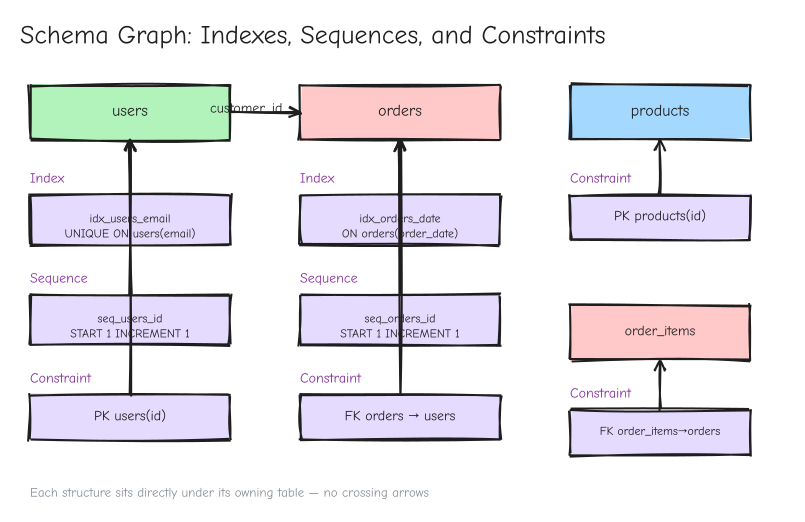 Each index, sequence, and constraint sits directly under its owning table in the graph. The Reconstructor builds these connections as it processes each migration statement.
Edges are the graph’s superpower. A foreign key from orders.customer_id to customers.id creates a directed edge. An index on orders(order_date) creates a searchable attribute. The graph structure means you can traverse relationships — “show me all tables that depend on users” — without writing complex SQL joins against information_schema.
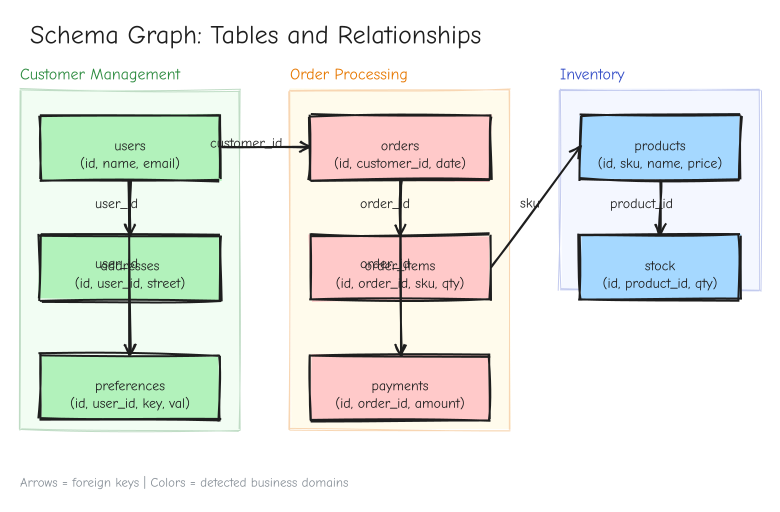 Tables as nodes, foreign keys as directed edges. Community detection clusters tables into business domains — customer management, order processing, inventory — that map directly to microservice boundaries.
The graph is built incrementally as migrations are processed. Each migration adds, modifies, or removes nodes and edges. The final snapshot is a complete, queryable representation of the schema state.
One of SQLfy’s more unusual features is automatic business domain detection. Using NetworkX community detection algorithms, SQLfy analyzes the schema graph and identifies clusters of tables that form coherent business domains. The algorithm treats the schema graph as a weighted network — tables that share foreign keys, have similar naming patterns, or are frequently joined together form communities. The result is a map of your schema into logical domains: “customer management,” “order processing,” “inventory tracking.” If you’re decomposing a monolith into services, this directly maps to microservice boundaries.
What You Can Do With It
SQLfy’s CLI exposes 33+ subcommands, but they’re not a random collection of features. They map to real work people do with schemas.
When you need to see what exists, dump outputs the reconstructed schema as SQL DDL, manifest lists all tables and columns in a structured format, and export gives you JSON, YAML, or custom formats. If you’re onboarding a new developer, graph renders the schema as DOT, Mermaid, Excalidraw, or Draw.io — something you can actually look at together.
When you need to understand what changed, diff compares two schema versions side by side, diff-versions does the same for any two Flyway versions, and drift compares two migration directories and generates repair SQL. rollback-analysis answers the question nobody wants to ask: “what would break if we reverted this migration?”
When you need to assess risk, safety classifies migrations as SAFE/MEDIUM/HIGH/DANGEROUS, cost estimates execution time, lock duration, and data movement, and stability tracks schema churn rates per table. insights finds orphan tables, missing primary keys, and other structural issues. health scores your migration folder for naming, ordering, and completeness.
When you need to trace impact, lineage tracks column-level data flow, impact does graph-traversal analysis for schema changes, and deps shows the migration dependency graph. classify provides semantic classification of migration operations.
When you need intelligence, ask gives you RAG Q&A over your schema using local BM25 or Voyage AI embeddings, chat opens an interactive multi-turn conversation, and chunks pre-formats schema data for LLM consumption. pii-scan detects PII patterns for GDPR/CCPA compliance.
When you need quality gates, lint integrates sqlfluff for SQL style checking, naming analyzes naming conventions, simulate runs a migration without applying it, and hooks generates git pre-commit hooks for migration validation. integrity verifies file integrity with SHA256, and provenance pulls git history for each migration file.
The breadth is deliberate. SQLfy aims to be the single tool you reach for when you need to understand, analyze, or visualize your database schema — not just reconstruct it.
AI Context and the Desktop App
The asker.py module implements a RAG system that gives AI agents context about your schema. When you ask “how do I join orders with customers?”, the system retrieves the relevant schema chunks and feeds them to the LLM.
SQLfy supports two retrieval strategies. Local BM25 uses keyword-based retrieval with no external API calls, no API keys, and works offline — good enough for most use cases. Voyage AI embeddings, enabled with the --embed flag, provide dense vector embeddings for semantic retrieval, better for complex questions that require understanding relationships, not just keyword matching.
The schema chunks are pre-formatted for LLM consumption. Each chunk contains a table’s columns, types, constraints, and relationships — enough context for the LLM to write accurate SQL without hallucinating column names or types. The chat command takes this further with interactive multi-turn conversation, where you can ask follow-up questions and explore the schema iteratively.
SQLfy also ships with a desktop application built on React 19, Vite, and Tauri 2. The app provides visual schema exploration — a spatial interface for navigating tables, columns, and relationships. Why a desktop app for a CLI tool? Because schema exploration is inherently spatial. You want to see the graph layout, zoom into clusters, click through relationships, and visually identify patterns that a text listing would miss. The CLI gives you power and scriptability; the desktop app gives you spatial intuition. The app shares the same Reconstructor engine as the CLI — same migration files, same schema graph, same analysis tools, just with a visual interface.
Design Trade-offs and Lessons
SQLfy makes several deliberate trade-offs worth understanding:
Flyway-specific. The migration parser is tightly coupled to Flyway naming conventions (V1__description.sql). Other migration tools — Liquibase, Django, Alembic, Prisma — would need new parsers. This is a focused bet: Flyway is the most common SQL-first migration tool, and supporting it well is more valuable than supporting everything poorly.
No live database connection. SQLfy reconstructs schema state from DDL files, not from a running database. This is a feature — no credentials needed, no network access required, no risk of accidentally modifying production. But it means SQLfy can’t detect drift between your DDL files and the actual database state. That’s a different problem, requiring a different tool.
In-memory scaling. The SchemaGraph holds all tables, columns, constraints, and edges in memory. Very large schemas (thousands of tables) could strain memory, though the pruning and filtering options help. For most real-world schemas — even large enterprise ones — this is not a practical limitation.
Per-statement error recovery. One bad SQL statement in a migration file doesn’t kill the entire run. Errors are logged and collected while processing continues. This is pragmatic: in a codebase with 300 migrations, you don’t want one syntax error in migration #247 to prevent you from seeing the schema state at migration #300.
These trade-offs reflect a philosophy: ship a tool that works for 95% of real-world cases, handle errors gracefully, and don’t try to be everything to everyone.
Getting Started
SQLfy installs via uv, the modern Python package manager. First, install uv if you don’t have it:
# macOS / Linux
curl -LsSf https://astral.sh/uv/install.sh | sh

# Windows (PowerShell)
powershell -ExecutionPolicy ByPass -c "irm https://astral.sh/uv/install.ps1 | iex"
Then install SQLfy as a global CLI command:
uv tool install sqlfy-cli
Verify it’s working:
sqlfy --version
Point it at a Flyway migration directory:
sqlfy dump ./src/main/resources/db/migration --dialect postgres
Reconstruct the schema at a specific version:
sqlfy diff-versions ./migrations --from V1 --to V50
Get AI-ready schema chunks:
sqlfy chunks ./migrations --dialect oracle --format json
If you want to hack on SQLfy itself, clone the repo and install from source:
cd cli && pip install .
SQLfy is open source under the MIT license. The full source code is available on GitHub. If you’ve ever stared at a migration folder wondering what your schema actually looks like — give it a try.