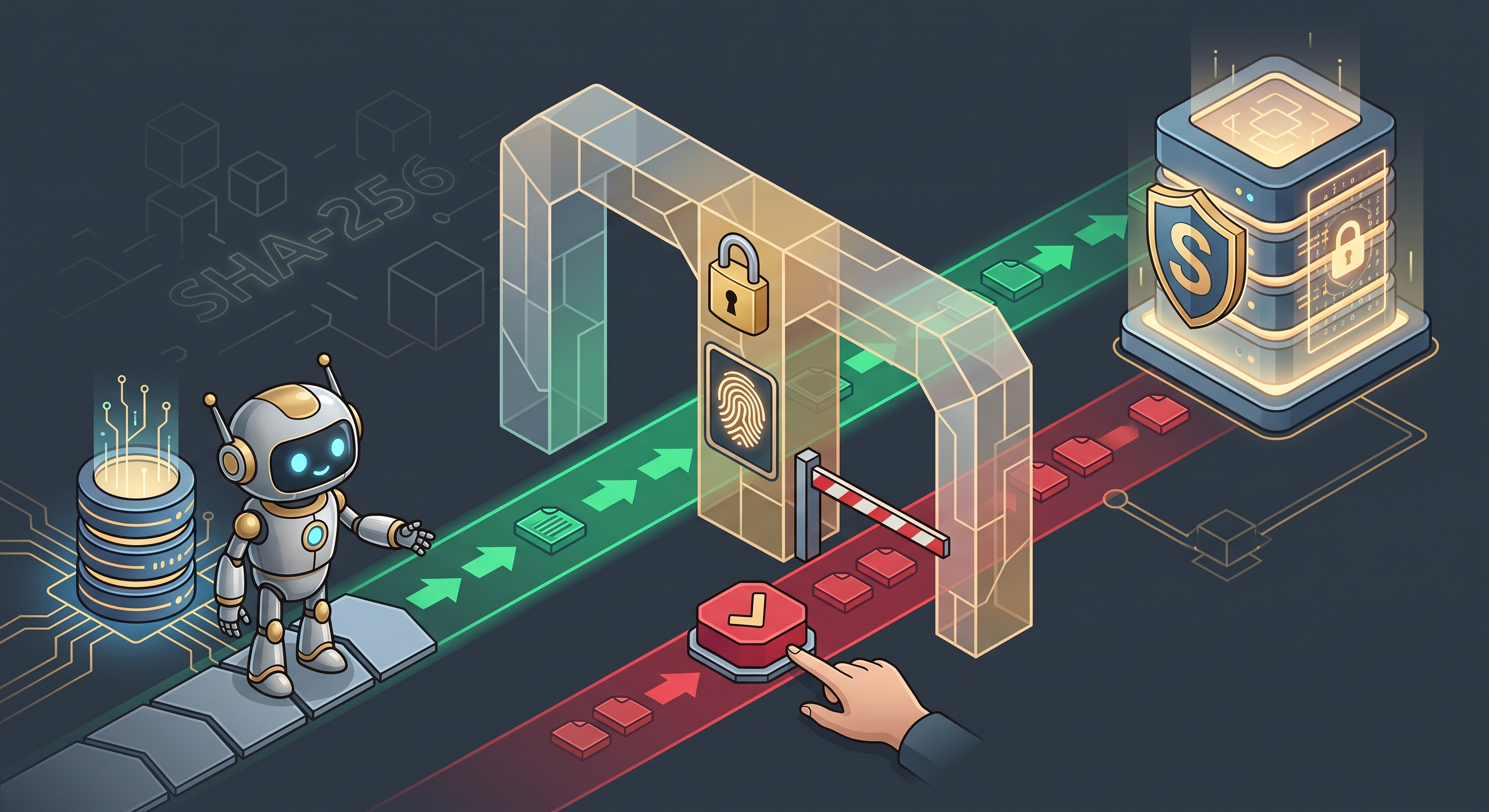
There’s a fundamental tension in giving AI agents database access. Reads are enormously valuable. Writes are existential risk. I wanted a tool that treated them differently.
An agent that can explore your schema, run analytical queries, and understand your data architecture writes better SQL and catches issues faster than any static linter. But a single misplaced UPDATE can corrupt production data, and a DROP TABLE can destroy months of work.
The obvious reaction is to ban AI agents from databases entirely. I think that’s the wrong reaction. I built SecureDBLink to make autonomous reads the default while sending every write through a human approval gate at the protocol level — not through a policy document that nobody reads, but through the tool itself.
The Permission Problem in AI Database Access
There’s a fundamental tension in giving AI agents database access, and in my experience it shows up the moment you connect an agent to a real database. On one hand, autonomous read access is enormously valuable. An agent that can explore your schema and understand your data architecture is an agent that can write better SQL, catch schema issues, and accelerate development.
On the other hand, write access is existential risk. Policy documents don’t enforce themselves. “Only read from production” is a rule that depends on every developer, every AI tool, and every configuration being correct, every time. One misconfigured MCP server, one accidentally permissive agent, and the rule is broken.
SecureDBLink replaces the policy with protocol enforcement. The MCP server itself classifies every SQL statement, routes reads through a free lane, and forces every write through a human approval gate. The agent doesn’t need to follow a policy — the policy is built into the tool. In my opinion, this is the only approach that scales: you can’t rely on every tool in the chain to enforce the same rules, so you enforce them at one chokepoint.
Two-Lane Traffic: Free Reads, Gated Writes
The architecture implements a two-lane traffic system for SQL statements.

The classifier is the traffic controller. It examines the first keyword of every SQL statement and routes it to the appropriate lane. The keyword sets are:
-
SAFE:
SELECT,EXPLAIN,SHOW,DESCRIBE,DESC,PRAGMA,WITH -
MUTATION:
INSERT,UPDATE,DELETE,UPSERT,MERGE,REPLACE -
DESTRUCTIVE:
DROP,TRUNCATE,ALTER,CREATE,GRANT,REVOKE,RENAME,COMMENT
Mutations and destructive operations both go through the write lane. Safe statements go through the read lane. No exceptions.
The agent doesn’t decide which lane a query belongs to. The classifier decides. This is the critical security property, and it’s the part I’m most confident about: the agent cannot bypass the approval gate, even accidentally, because the classification happens before execution, not after. I’ve seen agents try to be “helpful” by running queries they think are read-only — the classifier doesn’t care what the agent thinks.
The WITH-Clause Edge Case
The classifier’s trickiest part is how it handles WITH statements, and in my experience this is the kind of edge case that most people miss until it bites them.
A WITH clause is a Common Table Expression (CTE). In PostgreSQL, you can write data-modifying CTEs — queries that insert, update, or delete data as part of a CTE:
WITH deleted AS (
    DELETE FROM expired_sessions
    WHERE expires_at < NOW()
    RETURNING *
)
SELECT COUNT(*) FROM deleted;
This statement starts with WITH, which is in the SAFE set. But it contains a DELETE in the CTE body. A naive classifier would let this through as a safe read.
SecureDBLink’s classifier doesn’t make that mistake. When the first keyword is WITH, the classifier strips SQL comments, then scans the entire statement for mutation and destructive keywords. If it finds DELETE, UPDATE, INSERT, DROP, or any other gated keyword anywhere in the statement, it routes the query to the write lane. If no dangerous keywords are found, it classifies the statement as safe — so pure WITH ... SELECT CTEs pass through freely.
The edge case is real, and getting it wrong means your approval gate has a hole the size of a CTE. Take it with a grain of salt when other tools claim keyword-based classification is sufficient without this kind of CTE-aware scanning.
Token Binding: How Approval Tokens Work
The approval token is the core of the write lane’s security. When an agent calls preview_mutation, the server generates a secrets.token_urlsafe(16) token and stores the exact SQL string and connection name in an in-memory dict, keyed by the token:
token = secrets.token_urlsafe(16)
_tokens[token] = _PendingToken(
    sql=sql.strip(),
    connection=connection_name.lower(),
    created_at=time.time(),
    used=False,
)
When the agent calls execute_mutation, the server looks up the token and compares the stored SQL and connection name directly against what the agent is trying to execute. Four checks must all pass:
-
Token exists — the token was previously generated by
preview_mutation - Token not expired — the 5-minute TTL hasn’t elapsed
- Connection matches — the token was generated for this specific connection
- SQL matches exactly — the SQL string is byte-for-byte identical
The binding is tight. You can’t reuse a token against a different database. You can’t modify the SQL after approval. You can’t replay a token after it’s been used. Any modification — even a single character change — invalidates the token.
This is not just a security measure; it’s a usability feature. The human reviewer sees exactly what the agent will execute. No bait-and-switch, no hidden modifications, no “I’ll just add a WHERE clause to be safe.” In my opinion, this direct comparison approach is more transparent than a hash-based binding would be — you can read the stored SQL and verify it yourself, rather than trusting that a hash matches.
The Vault: Three-Tier Credential Storage
Credentials need to live somewhere. SecureDBLink’s vault system provides three tiers of storage, each solving a different problem.
Tier 1: OS Keyring. The keyring library interfaces with the operating system’s credential manager — macOS Keychain, Linux Secret Service/D-Bus, Windows Credential Manager. Credentials are stored as JSON blobs under the service name securedblink. The keyring is encrypted at the OS level, and the credentials never appear in files, environment variables, or chat history.
Tier 2: Atomic JSON Index. A metadata file at ~/.securedblink/aliases.json tracks alias names, creation timestamps, and source types — but never credentials. This file is written atomically: write to a temp file, then rename. If the process is killed mid-write, the original file is preserved. No corruption, no partial state.
Tier 3: Path Guard. For file-based registration (vault_register_from_path), paths are validated against SECUREDBLINK_ALLOWED_ROOTS — a colon-separated list of directories. Symlinks are resolved via os.path.realpath() before checking against the allow-list, preventing symlink-based traversal attacks.
The three tiers serve different use cases. The keyring is for production credentials — encrypted, managed by the OS, never touched by application code. The JSON index is for metadata — which aliases exist, when they were created, what source they came from. The path guard is for development convenience — importing credentials from .env files or Spring Boot application.yml configurations.
Credential Redaction: Never Leak in Logs or Errors
MCP tool responses flow through LLM context. A credential that appears in an error message becomes a credential in chat history. A credential in a log file becomes a credential in the agent’s memory. SecureDBLink treats this as a hard constraint, not a nice-to-have.
The redact.py module provides four redaction mechanisms:
-
Recursive dictionary redaction — walks any nested dict/list structure (up to 10 levels deep) and replaces values for sensitive keys (
password,secret,token,api_key,credentials, etc.) with[REDACTED] -
URL credential stripping — removes username/password from database connection URLs (
postgresql://user:pass@host/dbbecomespostgresql://host/db) - Exception message sanitization — catches exceptions that might contain credentials in their messages and redacts them before they reach the output
- Logging redaction — applies polymorphic redaction to any object (dict, list, str, tuple) before it reaches log output
The redaction is applied at every boundary: log output, error responses, tool results. There is no code path where a credential can reach stdout or a file without being redacted first.
The kind of engineering that looks paranoid until the day it saves you. A database URL in a log file is a credential leak. A password in an error message is a credential leak. SecureDBLink ensures these leaks never happen.
Stderr-Only Logging: Preserving MCP stdio
MCP uses standard input/output (stdio) for protocol communication between the agent and the server. The agent sends JSON-RPC messages on stdout, and the server responds on stdout. Any other output on stdout — print statements, log messages, error output — corrupts the protocol.
SecureDBLink’s logging module (log.py) implements a custom _StderrLogger that resolves sys.stderr at call time, not capture time. This is a subtle but important distinction. If the logger resolves stderr when the module is imported, and something redirects stderr later (like pytest’s capsys/capfd fixtures), the logger would write to the wrong stream. By resolving stderr at each call, the logger always writes to the actual stderr, even if it’s been redirected.
The structlog configuration uses a custom processor chain: add_log_level → TimeStamper → StackInfoRenderer → format_exc_info → ConsoleRenderer. No ANSI colors for CI-friendly output. The result is structured, timestamped, log-level-aware output that never touches stdout.
This is MCP-specific engineering. Standard Python logging would work fine for a normal application, but MCP’s stdio protocol requires discipline about what goes where. SecureDBLink enforces that discipline at the logging layer.
10 MCP Tools: The Full API Surface
SecureDBLink exposes 10 MCP tools, grouped by purpose:
Discovery:
-
list_connections— show all environment variable and vault connections -
list_tables— list tables and views in a connection -
describe_table— column-level schema details (types, primary keys, foreign keys, indexes)
Query:
-
query— execute read-only SQL (capped atDB_MAX_ROWS, default 500 rows)
Mutation:
-
preview_mutation— preview a write operation and receive a one-time approval token -
execute_mutation— execute the mutation after human confirmation
Vault Management:
-
vault_register_connection— store credentials in the OS keyring -
vault_register_from_path— import credentials from.env,.properties, or.ymlfiles -
vault_list— list vault aliases (metadata only, never credentials) -
vault_revoke— remove a vault alias
The discovery tools are safe for autonomous agent use. The query tool is safe for autonomous agent use. The mutation tools require human approval. The vault tools are for setup and management.
The row cap on query (default 500) prevents agents from dumping entire tables into context. This is both a security measure (preventing data exfiltration) and a practical one (preventing context window overflow). The cap is configurable via DB_MAX_ROWS.
Platform-Aware Security Verification
On startup, SecureDBLink’s verify_secure_backend() checks that the keyring backend is actually secure. The keyring library supports multiple backends, and on some systems — particularly headless Linux servers without a D-Bus session bus — it may fall back to a plaintext file backend that stores credentials in ~/.keyring without encryption.
SecureDBLink detects this and warns loudly. The verification is platform-specific:
- macOS: expects Keychain backend
- Linux: expects Secret Service/D-Bus backend
- Windows: expects Windows Credential Manager backend
If the backend is insecure, the tool prints a platform-specific help message explaining how to install the correct backend. The tool still works — it degrades to env-var-only mode — but it makes sure you know the vault is not operating at full security.
This is defense in depth, and it’s the kind of check I added after realizing that a headless CI runner was silently storing credentials in plaintext. The vault is optional — you can use environment variables for credentials. But if you choose to use the vault, SecureDBLink ensures it’s actually secure. Take it with a grain of salt if you’re on an unusual platform — the verification covers the common cases, but exotic setups may need manual checking.
Design Trade-offs
SecureDBLink makes several deliberate trade-offs, and I want to be transparent about them because some of these might be dealbreakers for your use case.
In-memory token store. Approval tokens live in a Python dict, not persisted to disk. If the MCP server restarts, all pending approvals are lost. This is intentional — tokens are ephemeral by design, and persisting them would create a new attack surface. But it means long-running approval flows can’t survive restarts. This is probably the trade-off I’ve thought about the most; in practice, it hasn’t been a problem because approval flows are quick, but it’s worth knowing.
GPL-3.0 license. Unlike some similar tools that use MIT, SecureDBLink uses GPL-3.0. This has stronger copyleft requirements — derivative works must also be GPL. This is a deliberate choice: a security tool’s code should be open and auditable, and GPL ensures it stays that way. In my opinion, this is the right call for a security-critical tool, even if it limits adoption in some contexts.
No batch operations. Each mutation must be individually previewed and approved. There’s no “approve all 5 statements in this migration” flow. This is a security property: batch approval would require the human to review multiple statements at once, which increases the chance of missing something dangerous. It’s also more annoying, and I’m aware of that trade-off.
Keyword-based classifier. The classifier doesn’t parse SQL deeply — it looks at keywords, not semantics. A stored procedure call that internally does writes would be classified as safe. This is an honest limitation: full SQL parsing would require a complete SQL parser, which is a much larger dependency. The WITH-clause handling gets you most of the way there, but it’s not perfect.
Single-user model. The vault and token system assume a single user. There’s no multi-tenant isolation or role-based access control. This is appropriate for the target use case — individual developers using AI coding assistants — but wouldn’t work for a shared team database gateway.
Keyring dependency. On headless Linux servers without D-Bus, the vault may not work. SecureDBLink degrades gracefully to env-var-only mode but warns loudly. This is the right behavior: the tool should work everywhere, but it should be honest about what’s secure and what isn’t.
Getting Started
SecureDBLink requires Python 3.12+ and installs via a standalone binary or via uv.
Standalone binary (recommended):
curl -fsSL https://raw.githubusercontent.com/paulushcgcj/securedblink/main/install.sh | bash
Via uv (when you need optional database drivers):
uv tool install securedblink
# optional drivers
uv tool install 'securedblink[oracle]'
uv tool install 'securedblink[mysql]'
uv tool install 'securedblink[mssql]'
Set up database connections via environment variables:
export DB_MYDB="postgresql://user:password@localhost:5432/mydb"
Start the MCP server:
securedblink
Or register credentials in the vault:
securedblink register --alias mydb --url "postgresql://user:password@localhost:5432/mydb"
The MCP server is ready for agent integration. The agent can now read from your database freely, and every write will require your explicit approval. This is the setup I use on my own projects — it’s straightforward, and the security guarantees are enforced from the first query.
If you’ve been hesitant about giving AI agents database access, I hope this gives you a path forward. The reads are worth it; the writes just need a gate.
SecureDBLink is open source under the GPL-3.0 license. The full source code is available on GitHub.